Areas
All areas are recorded with a git issue (all areas get added to the “Areas” Project). Any area you are contributing to add yourself as an assignee.
Encounters and EXP
The random encounter system on rest checks for the level of an area, if a level is set it counts as a hostile level and will roll for a random encounter. Additionally it will use this level in order to calculate the DC of the survival check.
Creatures are rewared EXP based on the CR_LEVEL of the area.
Local Variable
INT CR_LEVEL 1
Resting
The by default all areas have resting disabled, exceptions are made by local variable on the area. Setting it to 1 makes the area allow resting. Resting will require the player to be near a resting placeable (bed,bedroll, tent, ect).
Local Variable
INT REST_AREA 1
World Map System
In order to make a trigger go to the world map, set the transition destination to “none” and set the on-click script to mapabsalom. This will send anyone who uses the trigger to the world map of Absalom.
This will also prevent use of the trigger if the user is in combat.
Flavor Text Trigger
Ground trigger that when stepped in prints flavor text to the player. It already exists on the palette generic triggers "flavor text' and can be used accordingly.
Local Variable
STRING TEXT textgoeshere
Water Slow Trigger
Custom Trigger palette, generic trigger, water slow trigger. Paint where you want them to be slowed by 50% it's okay if it overlaps they may get slowed double while in overlap though but not really a big deal.
Terrain Type
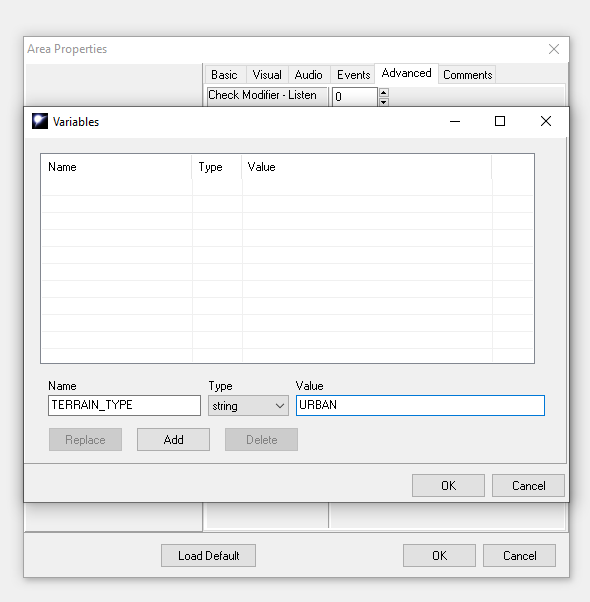
All areas must have their terrain type specified in a local string. This is referenced by ranger favored terrain.
This is optional if none is specified it will pull a default based on the tileset. If specified it will override the default.
Example: STRING TERRAIN_TYPE COLD
- COLD (ice, glaciers, snow, and tundra)
- DESERT (sand and wastelands)
- FOREST (coniferous and deciduous)
JUNGLE(Not yet implemented, no such areas exist yet)- MOUNTAIN (including hills)
PLANES(Not yet implemented, no such areas exist yet)- SWAMP
- UNDERGROUND (caves and dungeons)
- URBAN (buildings, streets, and sewers)
- WATER (above and below the surface)
Example of Area Properties - > Advanced -> Variable -> Press Add and save
Sound Properties
When placing a sound in the area, add the following prefix to the tag before placement. Labeling area soundset tags, after being placed for easier bug fixes.
- Day (soundset) - for sounds playing in the daytime only.
- Night (Soundset) - for soundsets playing in the night only.
- Always(Soundset) - for soundsets always active, despite time of day.
Underwater
Marks the area as underwater and checks accordingly when a player enters it.
Local Variable
INT UNDERWATER 1
Horses
Area trasitions check to see if a player is mounted, to prevent a player from transitioning to an area that doesn't allow mounts add this local variable to the destination area. (the player will dismount first before transitioning)
Local Variable
INT X3_NO_MOUNTING 1
To prevent horses from following (if still in the party) use this variable on the destination area to prevent party horses from coming along for the transition. (also kicks them from the party)
Local Variable
INT X3_NO_HORSES 1
Objects
Placeable Properties
Function to optionally disable usability entirely of an object. Players will be unable to click on this object to interact with it – works on anything (even npcs) not just placeables. This also removes all highlights
Local variable
int DISABLEUSEABLE 1
Function to optionally disable mouseover and/or TAB highlight per-object, has muliple options each one is exclusive. By choosing one it disables all the others. Will currently only work on Creatures, Doors (Hilite only), Items and Useable Placeables.
Local variable
string UIDISCOVERY NONE
NONEShows no highlight or text bubble (but the object can still be clicked on and used).
HIGHLIGHTMOUSEOVERShows only a highlight when moused over
HIGHLIGHTTABShows only a highlight when tab is pressed
BUBBLEMOUSEOVERShows only a text bubble when moused over
BUBBLETABShows only a text bubble tab is pressed
Function to manually set the distance in which a placeable will disappear in the background. The default is 90 for all placeables, or the fog if less than 90.If you want a plceable in the background to be shown you can set the distance further.
Local variable
int VISIBLEDISTANCE 1000
Resting
Objects marked with the “REST" local int mark them as resting objects (beds) allowing players to rest when next to them.
Local variable
int REST 1
Knowledge Check on Placeable
Placeables will have bonus information added to their examine window if a player succeeds a skill check. Works with any skill number.
Arcana 30, Dungeoneering 31, Geography 32, History 33, Local 34, Nature 35, Planes 36, Religion 37, Linguistics 41, Spellcraft 16.
Local variable
string KNOWLEDGE_DESCRIPTION textLocal variable
int KNOWLEDGE_DC 10Local variable
int KNOWLEDGE_SKILL 1
Skill Check Transition Placeable
Placeable when used is a skill check, on success it teleports to the target waypoint. Can be used for any skill. Failure destination and fall distance is optional. Fall distance is in feet, damage dealt is equal to 1d6/10 feet, negated automatically by monk slow fall.
Acrobatics 21, Climb 38, Swim 39.
If no DC variable is set, it will auto succeed
On Used Script:
plc_skilltransLocal variable
string SUCCESS wp_x2_plc(tag of destination waypoint)Local variable
int SKILL 10Local variable
int DC 15Optional:
Local variable
string FAILURE wp_x2_plc(tag of destination waypoint)Local variable
int FALL_DISTANCE 350
Item Value
Item values need to be set manually, the value in the toolset is unreliable this completely replaces the base value as seen in the toolset.
Local variable
int VALUE 100
Influence Reward
New itemproperty for influence rewards. Assignable to any item.
Items with this property cannot be bought, sold, traded, dropped. Exceptions are if the target is a trashcan or if the player is inside of their vault.
Traps
Modular Traps
Any Dungeon (The area is on the dungeon reset Database, and is local variable set with the CR_LEVEL) can have a chance to spawn traps at any interactable door or placeable.
The type of the trap is random, and the Detec/Disarm/Effect DC is based on the CR_LEVEL of the area.
Additionally ground traps can be designated with a Trap Trigger (Trigger Palette > Custom1 > Modular Trap)
Additionally, an object (or area) can be set to never have a trap with the following:
Local Variable
int DONT_TRAP 1
Magic Traps
Traps that cast spells when triggered are magic traps. These traps are special in pathfinder. Only a class with the trapfidning class ability can disarm a magic trap regardless of their skill. The trigger for magic traps must be labeled with a local variable.
Local Variable
int MAGIC_TRAP 1
Merchant Dialogue
Reference a merchant's dialogue using the cv_*openstore* script in the “actions taken” tab of the dialogue. Referencing the resref of the target shop as a local variable string on the npc.
The merchant object is pulled directly from the palette and does not need to be placed in the world.
Local Variable
string *MERCHANT_RESREF arlostore123*